Know your stock,
unit by unit.
UpChannels keeps the stock at every location two ways in one catalog: bulk quantities for what you count, and serial-numbered units for what you track one by one, each with its condition, its own status, notes, photos and history. Every receipt, sale, transfer and count is a movement you can trace.
Every location, every unit
Inventory → Overview and Inventory → Management, on every plan.
Live stock
at every location.
The Snapshot shows each active location’s stock three ways — combined, bulk and trackable — with five cards: products, available quantity, trackable items, total value and low stock. Available is what you can sell, the serialized units plus the bulk quantity, and the page checks that the sum holds on every row. Value is on-hand at the average cost from receiving, the same basis as the Inventory Report.
A stock check that
fixes what it can.
Audit looks for the inconsistencies that quietly break reports: a movement history that does not add up to on-hand, an available figure that does not match on-hand less held stock, more promised than is on hand, stock held by no order. It offers a fix for each one it can repair, ticked for you, and Review & Apply shows the summary before anything changes. What needs a person is listed under Needs manual review.
Every unit
has its own history.
A serial-numbered unit carries its condition — New, Open box, Used or Damaged — and a status from your store’s own list, such as Pending inspection, In repair, Out on loan or Ready for sale, or a jeweler’s In showcase and Out on memo. Each status says whether its units can be sold, and the Change status dialog says what will happen to stock before you save. A note of up to 2,000 characters and up to six photos go with each update.
Move stock between
locations in one step.
Pick the From and To locations and the quantities, and Submit shows what will move before anything does. Post transfer moves it at once: the From location goes down, the To location goes up, and the stock keeps its value, moving at the From location’s average cost. Each transfer is kept under Recent Transfers with its own number.
What to buy, and
what has sat too long.
Reorder Risk on the Inventory Report lists the products below the reorder point you set, the ten largest shortfalls first, with a link to Procurement. The Aged stock tab lists the stock on hand over 90, 180 or 365 days, at cost, for all locations or one. In Quick Facts, the Aged stock row’s Make markdown tags opens Price Tags on exactly that stock.
A label for every unit,
on sheets or a roll.
Labels prints one label per unit. A serialized unit prints its serial number as a barcode, and a product prints its maker’s UPC or EAN when the number is valid, otherwise its SKU: UpChannels never makes up a UPC. Print on Avery sheets or on a roll label printer such as a Zebra, Rollo, Brother QL or DYMO 550, and each device remembers its own. Print labels for this delivery appears as soon as a receipt is saved.
Count a location, typed or scanned.
A count runs one session per location. Type the counts on the Count tab, then End Session shows what will change and Post counts applies each difference to on-hand — sales, receipts and transfers made since the count are kept. A missing serialized unit is marked Not Available one by one, never guessed. Or walk the floor with a barcode scanner or a phone camera in a scan count, which reports every difference and who counted it. Write-offs are booked to Inventory Write-Offs at average cost.
What Inventory Management does not do
- A transfer posts at once. There is no in-transit stage, and a posted transfer cannot be changed or cancelled: transfer it back instead.
- The app picks which serialized units a transfer moves, the oldest first.
- Nothing reorders by itself. Reorder Risk shows what is short, and you raise the purchase order.
- Stock is kept per location. There are no bins, shelves or storage areas inside a location.
- It does not list stock on online marketplaces or sync it with another store system.
- Labels print through the browser’s print dialog. There is no label export, and printing is not recorded.
Stock figures, and a scanned product’s stock by location.
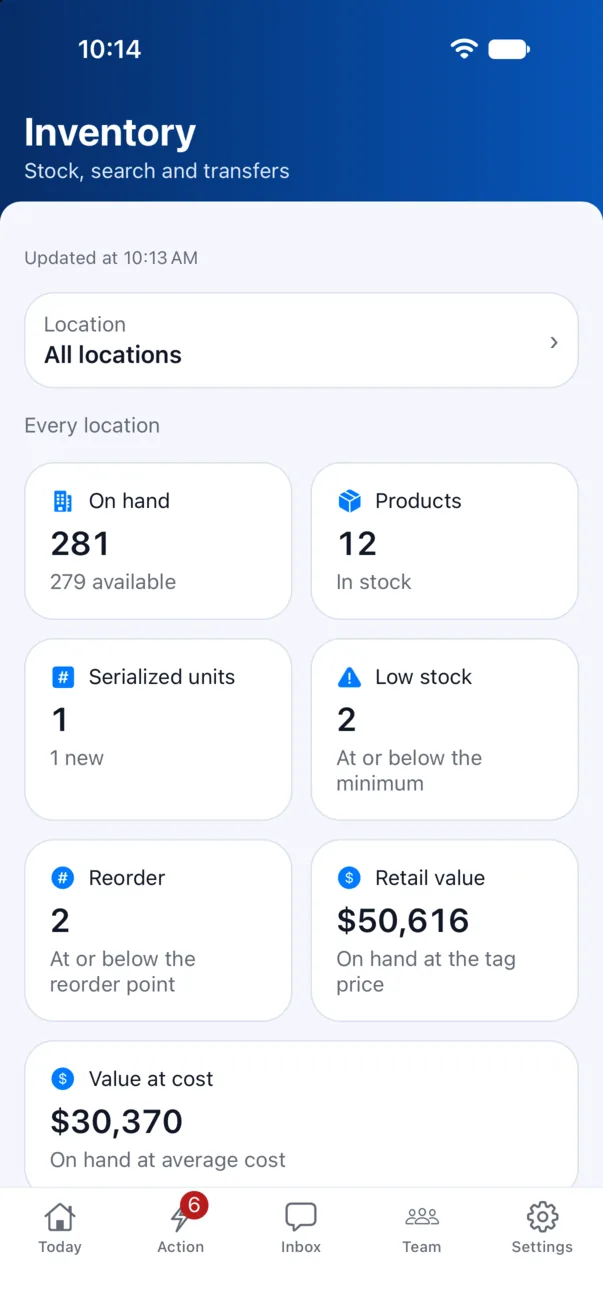
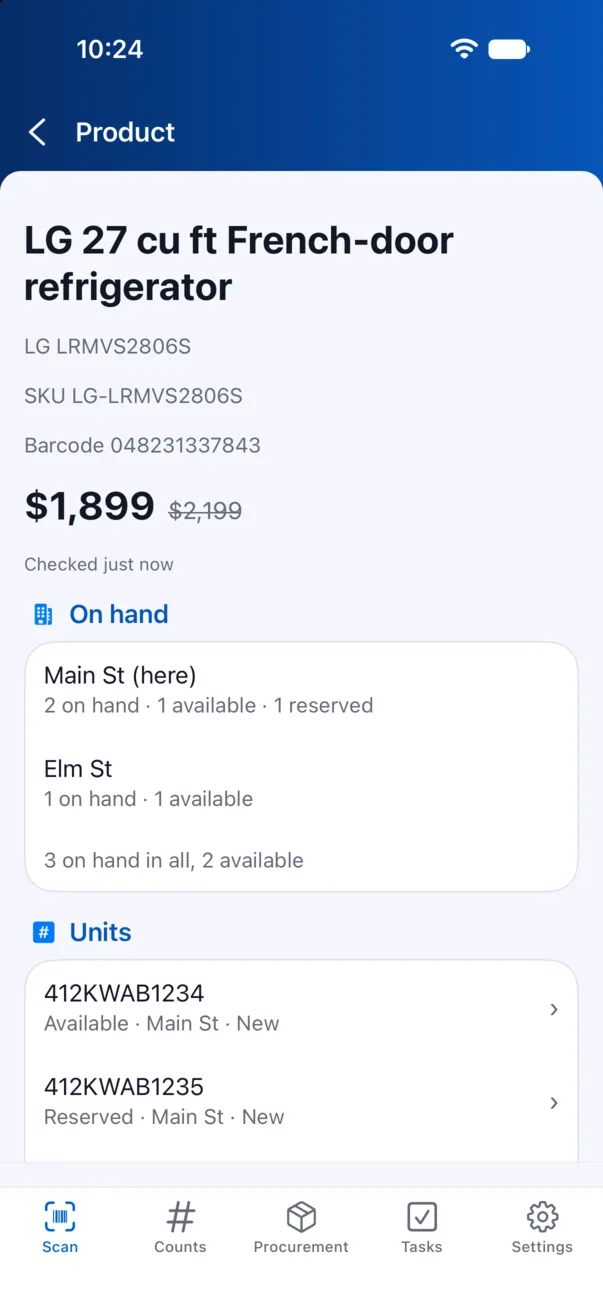
Inventory shows what is on hand and available, products in stock, serialized units, low stock, what to reorder and the retail value, for every location or one. Scan a barcode and the product sheet shows its price and what is on hand, available and reserved at each location.
The UpChannels phone app is built and coming to iPhone and Android. It isn’t in the App Store or Google Play yet. Screens show sample data.
Inventory questions, answered
What is the difference between bulk stock and serialized units?
Can I set my own statuses for units?
How do transfers between locations work?
Will UpChannels tell me when to reorder?
Which label printers can I use?
Which plans include inventory?
Inventory Management is one part of UpChannels
UpChannels Inventory Management keeps stock for small retailers and service businesses at every location they run, on every plan. Stock is held two ways in one catalog: bulk quantities per location, and serial-numbered units that each carry a condition, a status from the store's own list, notes, photos and a history. The Snapshot shows live stock and value at average cost, and a nightly Audit finds stock that does not add up and offers fixes for a person to apply. Transfers between locations post in one step, counts are typed or scanned, Reorder Risk lists what is below its reorder point for the store to order, the Aged stock report lists what has sat over 90, 180 or 365 days, and Labels prints a barcode label for every unit on Avery sheets or a roll label printer. Every receipt, sale, transfer, count and correction is a stock movement that can be traced.
UpChannels is an all-in-one platform for small retailers and service businesses — sales, inventory, customers, scheduling, delivery, payments and finance in one system — and a real team that builds your website, runs your ads, and automates the busywork. The parts below share one set of records, so there is no integration to wire up between them; the pricing page shows which plan includes each one.
The product moves faster than this page. UpChannels ships updates most weeks, so a description here can lag what is already in the software. Where the two disagree, the running product is the current version — tell us if you find one and we will correct the page.
Ready to run your
whole business on one system?
Start your free trial today. No credit card required.
One system for the counter, the schedule, the truck and the books. A team to build the website, run the ads and take the busywork off you. Start with the trial, or let us walk you through it first.